For trailer dispatchers

Forget excel for your loading plans

Drop pallets onto a real trailer footprint. Custom sizes, stacking rules and per-client groups, sorted by your rules using a smart algorithm, exported as a manifest your dock crew and driver can easily read.

14-day trial EUR / FIN / custom pallets / Standard and custom trailers PDF ready
Plan · Mega 13.6 mAuto-pack
Pallets 00Remaining 13.60 lmClients 0 / 3
Utilization · 0%
AWienerberger
BSaint-Gobain
TrailerMega 13.6 × 2.45
Pallets0
Passes12 · deterministic
Solve147 ms
What it isA web-appNot a TMS, not a CAD tool. One job: turning a list of pallets into a loaded trailer the best way possible
Who built itA small teamA dispatcher and a developer, after one too many trailers rebuilt at the dock.
WhereTallinn, EEServers in Frankfurt. Data stays in the EU. and is never shared or sold.
Re-solve<0The Auto-pack algorithm is smart. The most efficient way will not always load the most pallets.
How it works

A planner that knows how trailers load.

Three steps cover almost every plan you'll make. Pick a trailer, drop the freight, send the sheet. Stacking, client clustering and EUR floor-space all run quietly underneath.

Step 01
Configure

Pick a trailer, define your pallets.
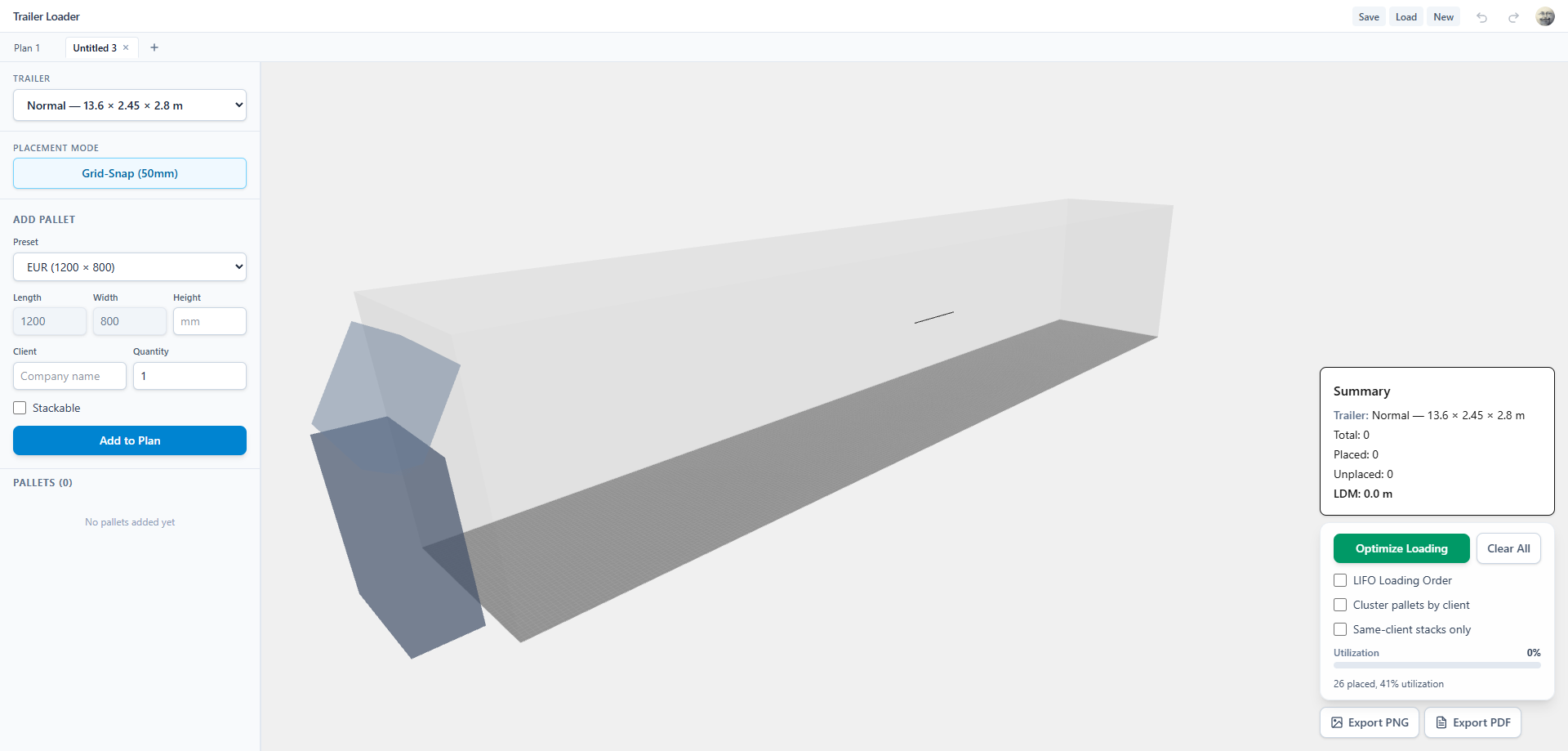
Mega, Jumbo, curtainsider, custom box-truck. Set length, width and load height. Pallets default to EUR and FIN, but custom footprints (1080×1100, 1140×980, anything you ship) are first-class.
Step 02
Pack

Drop freight. The grid figures out the rest.
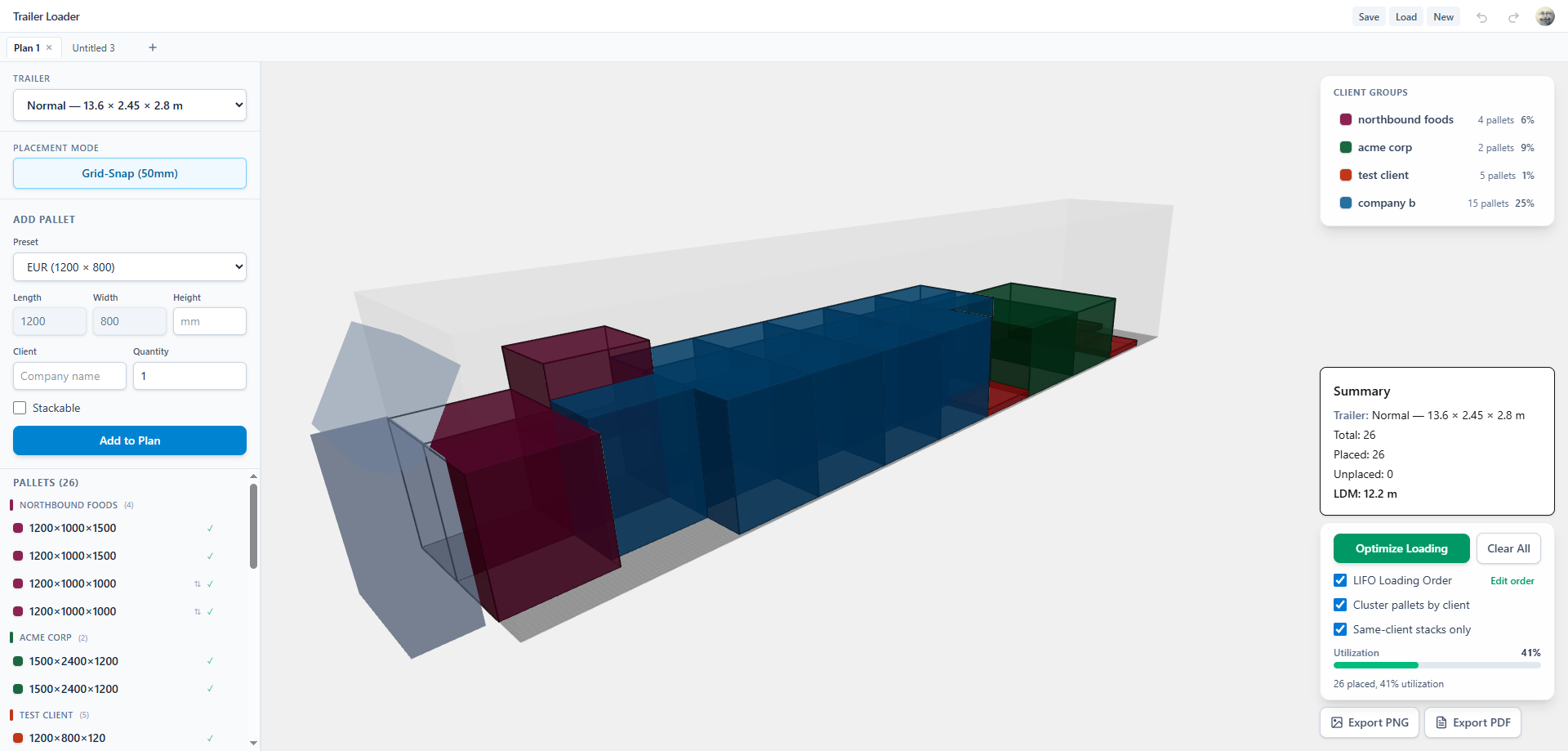
50 mm grid-snap, rotate with R, stack with shift-drag. Auto-pack runs a multi-pass deterministic search. It keeps each customer's pallets in compact zones, respects “do-not-stack-on” rules and protects EUR-sized floor for late additions. It re-runs on every change, usually under 200 ms.
Step 03
Ship

Export a manifest to your driver/loaders.

One PDF per trailer. Top-down and side views, with every pallet labelled by customer, so the loader knows what belongs to whom and the driver can see how it stacks. JSON export and TMS integrations are on the roadmap; talk to us if you'd like to shape that work.

Watch the full 3-minute walkthroughSee every step, from trailer setup to PDF export.
What's inside

Built around how trailers actually load.

It's not a CAD tool. It's not a spreadsheet. It's a planner that knows pallets stack, that EUR isn't FIN, that one customer wants their freight at the back, and that the dispatcher needed the sheet five minutes ago.

F-01Auto-pack

A smart auto-pack, not a brute force.

Multi-pass deterministic search ranks plans by fewer leftovers, tighter space, cleaner client zones and EUR-friendly floor, picking the smartest layout, not just the fullest.

F-02Manual control

Lock a pallet, re-pack the rest.

Drop the heavy machine where it has to go, pin it, and let auto-pack solve around it. Lock as many pallets as you need. Manual placements always win.

F-03Client groups

Group by customer.

Color, drop order, and per-group totals on the manifest, so the loaders know what comes off where.

F-04Manifest PDF

Driver loading sheet.

Top-down and side views, with each pallet labelled by customer. The loader sees what belongs to whom, the driver sees how it stacks. Print it, email it or send by WhatsApp

F-05Roadmap

Integrations: on the roadmap.

JSON export and native TMS integrations (Locus, Cargotor, custom) aren't shipping yet. Get in touch if you want to shape that work with us.

Trailer presets

Use presets. Or define your own.

Start with the standard European trailers. Hit ‘Custom’ when you don’t. Length, width and load-height in millimetres. No conversions, no assumptions.

CODE
UNIT
L × W (mm)
LM CAP.
HEIGHT
NRM
Normalcurtainsider · standard
13 600 × 2 450
13.60 lm
2 700 mm
33 EUR
MEG
Megacurtainsider · 3 m height
13 600 × 2 450
13.60 lm
3 000 mm
33 EUR
JMB
Jumbo2 boxes · 7.7 + 7.7 m
7 700 × 2 480 ·×2
15.40 lm
3 000 mm
38 EUR
FRG
Frigorefrigerated · narrow
13 300 × 2 450
13.30 lm
2 600 mm
33 EUR
CTR
Container 40'ISO · sea / rail
12 030 × 2 350
12.03 lm
2 390 mm
25 EUR
CST
Customdefine your own footprint
your numbers
computed
your max
CUSTOM
Pricing

Two plans. Prices you can read.

Pro is €29 for one dispatcher seat. Team is €19 per dispatcher seat, per month with a three-seat minimum. 14-day trial. Card on file, no charge until day fifteen. Annual billing knocks off 20%. Volume discounts for forwarders over 10 seats.

Standard

Pro for one. Team for the floor.

Pallet library, stacking, auto-pack, manifest PDF, client groups. Every feature, every account. Start with one Pro seat or run Team with a three-seat minimum; volume discounts kick in once you grow past ten.

PP / Standard · Monthly19+ VAT / seat · mo
  • 3-seat minimum
  • Full feature set
  • Cancel anytime
PP / Standard · Annual15.20+ VAT / seat · mo
  • 20% off, billed yearly
  • Same feature set
  • SEPA / bank transfer ok
Common questions

Things dispatchers actually ask.

Six questions that come up on the first call with most new yards. If yours isn’t here, drop us a line and we’ll add it.

Do you support custom pallet sizes, not just EUR/FIN?
Yes. Define a footprint in millimetres, mark it stackable or not, and save it as a preset. The auto-packer and the manifest both treat it as a first-class pallet.
How does auto-pack handle stacking constraints?
Per-pallet rules: max_stack, can_stack_on, can_stack_below. The packer never breaks them. It'll leave a gap rather than violate one. An optional setting keeps stacks within a single client. You can override with shift-drag if a customer asks for something special.
Can I group freight by client?
Yes. Groups have a color, a drop order, and per-group totals on the manifest. Auto-pack keeps groups together unless you let it interleave.
Can I lock orientation or position for specific pallets?
Yes. Pin a pallet to a slot or lock its rotation. Auto-pack treats locked placements as fixed and plans the rest of the trailer around them. Or re-optimize the whole trailer from scratch on demand. Useful for fragile freight, late additions, and customers who always want their freight at the door.
What's actually on the exported PDF?
A loading sheet for the driver and dock crew: top-down view of the trailer, side elevation showing stacking, and every pallet color-coded and labelled by customer so the loaders know what belongs to whom. Per-client totals and pallet count round it out. Fits on a single A4 when it can.
Can I push plans to my TMS?
JSON export and TMS integrations aren't shipping yet. If you'd like to push plans into Locus, Cargotor or your own system, get in touch so we can scope it with you.

Stop planning trailers on graph paper.

Set up your pallet library, your trailer fleet and your client list in twenty minutes. By the seventh trailer, you'll wonder how you did it the old way.